 ← Click to open in Google Colab
To download this notebook, click the download icon in the toolbar above and select the .ipynb format.
For any questions or comments, please open an issue on the c4dynamics issues page.
Car Tracker – YOLO3 Detector and Kalman Filter#
This notebook demonstrates how to enhance object tracking by integrating a Kalman filter with an object detection model.
Object detection models are widely used in computer vision to identify and localize objects in images and videos. However, raw detections often suffer from inconsistencies—bounding boxes may jitter across frames, and objects may momentarily disappear due to occlusions or detection failures.
While this implementation demonstrates tracking with YOLOv3, it is designed to be compatible with various object detection models.
To enhance tracking, a Kalman filter is used to:
Smooth detections, reducing noise in bounding box positions.
Handle missing detections by predicting object locations.
This notebook provides two tracking modes:
Steady-state tracking – Uses a precomputed, fixed Kalman gain for the entire runtime.
Adaptive covariance tracking – Dynamically adjusts the measurement covariance to account for variations in object movement.
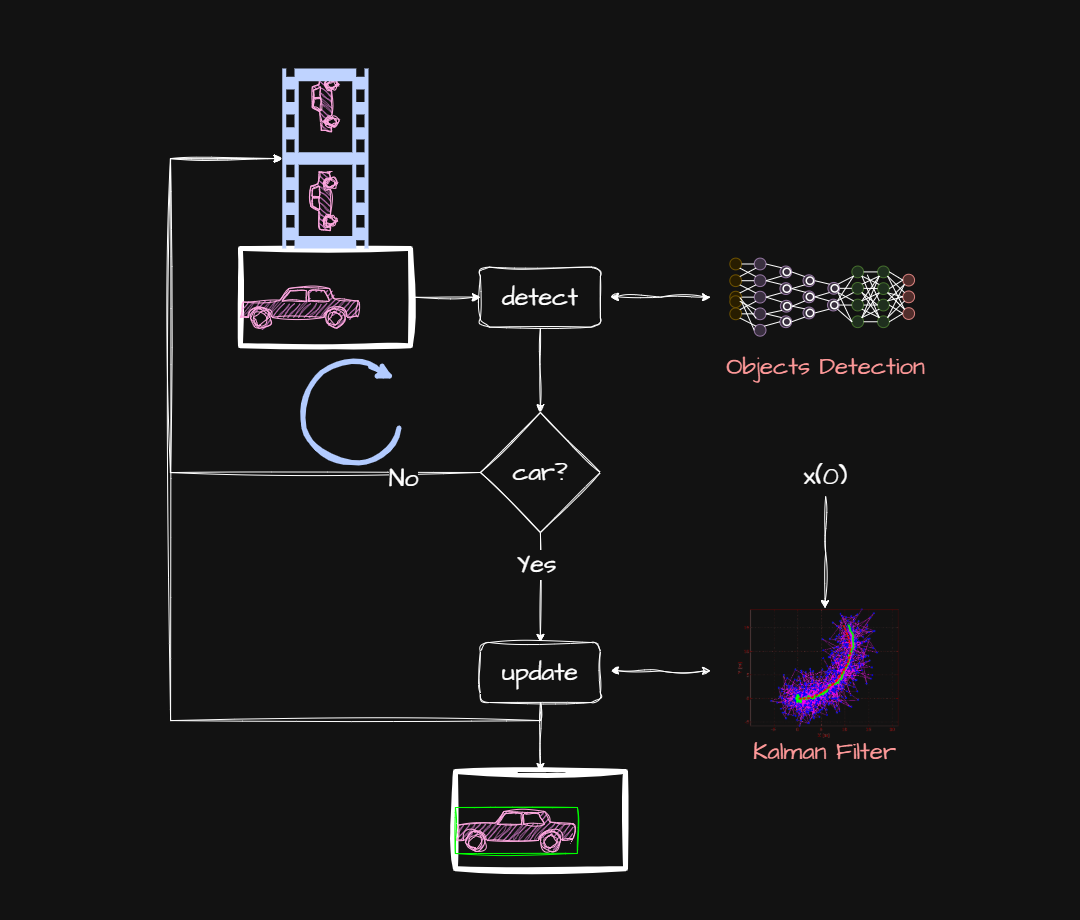
Figure 1: Program flowchart: 1. Read an image. 2. Run the detector. 3. Update the object state. 4. Draw a bounding box.
Object tracking starts with a source of images, such as a video stream or an image loader.
Each frame is sent to the object detection model, and the returned data is used to filter undesired objects and update the vehicle state.
The state is managed by the Kalman filter which holds the equations that describe the vehicle motion and the measurement properties.
The up-to-date position can now be drawn on the screen. This cycle repeats until the last frame in the images source.
Installing with the [vision] extra pins a compatible opencv-python version (OpenCV 5 removed the Darknet importer that yolov3 relies on to load the .cfg/.weights model).
[ ]:
# Check if Google Colab is running:
import sys
IN_COLAB = "google.colab" in sys.modules
if IN_COLAB:
!pip install "c4dynamics[vision]"
from google.colab.patches import cv2_imshow
[2]:
import cv2
import numpy as np
from IPython.display import Video
from matplotlib import pyplot as plt
from c4dynamics import plotdefaults
plt.style.use('dark_background')
Video Dataset#
[3]:
from c4dynamics import datasets
video = datasets.video('drifting_car')
Fetched successfully
video is now holding a path to the cached video file:
[4]:
Video(video, width = 640, height = 360, embed = True)
[4]: