 ← Click to open in Google Colab
Setup Guide#
Welcome! This notebook is a step-by-step guide to installing c4dynamics and import the package to use in your programs.
There are three main ways to install c4dynamics:
From
PyPI(pip)Directly from
GitHubUsing
pyproject.toml
Python Version#
c4dynamics requires Python 3.8 or newer.
Virtual Environment#
If you want to install and run c4dynamics in a virtual environment, follow this guide before proceeding: How to Install Multiple Python Versions on your Computer and use them with VSCode.
Dependencies#
c4dynamics uses three dependency sets, reflecting different levels of user involvement:
1. Basic#
For users working at a foundational level: defining state objects, manipulating them, and using library modules that do not involve computer-vision.
Included packages
numpyscipymatplotlibpooch
2. Vision#
Required for users working with computer-vision and tracking modules, such as:

Includes all basic dependencies, plus:
opencv-pythonimageionatsort
3. Dev#
For contributors who modify source code, run tests, or build documentation. Includes all vision dependencies, plus:
coveragenbsphinxsphinxsphinx-book-themesphinx_design
The dependency set installed depends on the chosen installation method. Each installation approach below explicitly references the relevant dependency set.
Note (Open3D)#
open3d is required for the animate function, but it is not included in any dependency set due to frequent installation issues reported by users. As a result, using animate or rigidbody.animate requires a separate installation:
pip install open3d
PyPI#
c4dynamics is published to PyPI, install it using pip:
[ ]:
!pip install c4dynamics
This approach is the most direct and easy, and automatically installs the package dependencies.
To install additional dependency sets:
[ ]:
!pip install "c4dynamics[vision]"
or:
[ ]:
!pip install "c4dynamics[dev]"
GitHub#
If you want the newest features, install the latest GitHub version (unstable).
To download the latest GitHub version, you can use git or download the ZIP archive from the GitHub page:
Using
git
[ ]:
!git clone https://github.com/C4dynamics/C4dynamics.git
From the GitHub page
If you don’t have git installed, you can download the repo manually. Go to the page of the repo, press the Code button and then select Download ZIP:
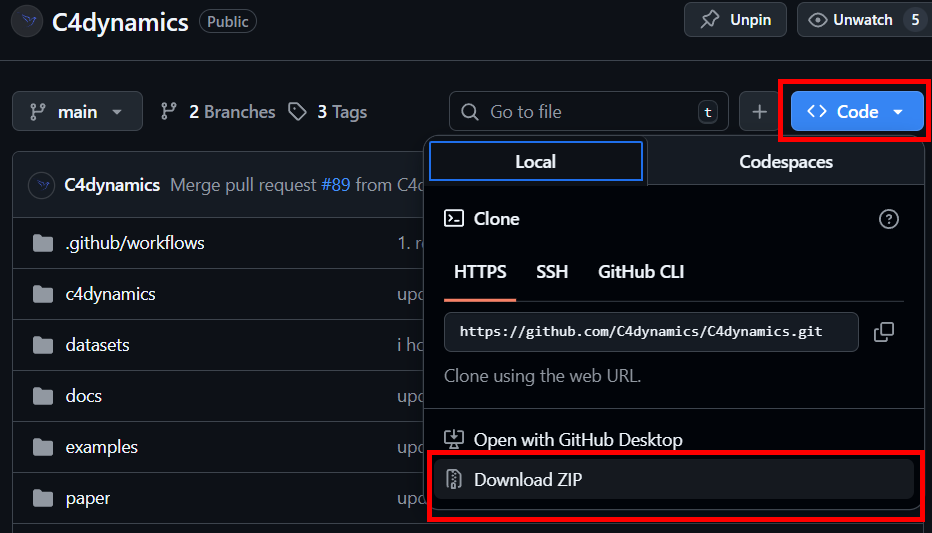
Whether you downloaded it using git clone or manually through the repo page, add the base directory (the folder where c4dynamics is stored) to the python path (replace /path/to/your/directory with the actual path, such as /home/user/c4dynamics on Linux or C:\Users\User\c4dynamics on Windows):
[ ]:
import sys
sys.path.append('/path/to/your/directory')
Now, change the current directory and install the dependencies:
[ ]:
!cd /path/to/your/directory
[ ]:
!pip install -r requirements.txt
The ‘vision’ set:
[ ]:
!pip install -r requirements-vision.txt
The ‘dev’ set:
[ ]:
!pip install -r requirements-dev.txt
pyproject.toml#
The third option allows you to modify the source code and have the changes reflected immediately (editable install).
[ ]:
!cd /path/to/your/directory
Where /path/to/your/directory is the root directory of c4dynamics.
Install:
[ ]:
!pip install -e .
For other dependency sets:
[ ]:
!pip install "c4dynamics[vision]"
Or:
[ ]:
!pip install "c4dynamics[dev]"
Verify Installation#
[ ]:
import c4dynamics
print(c4dynamics.__version__)
Now you can import c4dynamics and use it in your programs:
[ ]:
import c4dynamics as c4d # noqa: E501